Account Related PipelinesClosing This QuarterTop Deals > $1M
FROMOpportunitySELECTName · Stage · Probability · Amount ·
CloseDate
WHEREAmount > 100KAccountId =
:Id
DYNAMIC+ filter
OpportunityStageProbability.AmountClose
Acme – RenewalProposal70%$1.24MJun 30
Hooli – ExpansionNegotiation90%$0.98MJul
12
Globex – PlatformQualification20%$0.64MJun
18
Initech – New LogoProposal65%$0.41MAug 02
Umbrella – UpsellNegotiation85%$0.33MAug
19
Stark – RenewalProposal60%$0.52MSep 05
Wayne – New LogoQualification30%$0.27MSep
21
0
10…
Inline-edited · saved to Salesforce
✓Both Business & IT, Empowered✓Up to 95% Less Custom Code✓Build in Days, Not Sprints✓Rules, Not Code✓Drive Tech Debt Toward Zero✓Automation · Data Processing · Data Lists · Mass Actions · Cross-Org
Sync · More✓Both Business & IT, Empowered✓Up to 95% Less Custom Code✓Build in Days, Not Sprints✓Rules, Not Code✓Drive Tech Debt Toward Zero✓Automation · Data Processing · Data Lists · Mass Actions · Cross-Org
Sync · More
What DSP does
Surfaces.
Five surfaces, one consistent foundation. Pick one to see the capability, the architecture
behind it, and the challenges it solves.
CLICK A TAB TO EXPLORE01/05
Bulk processing, without the batch class.
Configure batch jobs as records — run on demand, schedule, chain, and monitor
large-volume processing without writing batch Apex, up to 20× faster than hand-built code.
Building batch jobs from scratch consumes weeks of developer time for each new process — repeatable
delivery becomes a struggle.
✓Rapid job creation
Build a batch job in a fraction of the time — 95% faster. Creating a job is as simple as creating a
record. No custom code required.
×Poor batch performance
Hand-crafted Apex batch processing is slow and resource-intensive — large volumes take hours, tying
up the org.
✓Up to 20× faster execution
Turn on Bulk API with a checkbox — a native high-volume processing path. Incremental Retrieve and
Delta Update run only what changed — among many built-in optimizations.
×No native job chaining
Salesforce lacks built-in support for sequential batches. Teams build fragile workarounds to stretch
limited scheduled job slots.
✓Job chaining
Chain batch jobs to run in sequence — eliminating fragile workarounds and freeing up scheduled job
slots to avoid governor limits.
×Opaque job scheduling
Scheduling batch Apex relies on rigid Setup forms or cron expressions, with no easy way to see which
job runs which process, pause, reschedule, or get a holistic view.
✓Scheduling you control
Schedule, pause, reschedule, reassign, and monitor jobs through simple CRUD on Schedule records — no
cron, full visibility.
×Limited transformations
Reshaping, enriching, deduping, or looking up values mid-batch means complex custom Apex, bulkified
by hand.
✓Rich function library
Reshape, enrich, dedupe, mask, roll up, or look up values mid-batch — 180+ built-in functions for the
most common use cases, bulk-safe out of the box — preview transformation before execution.
×No granular logging
Most batch frameworks offer no record-level detail, no easy way to isolate failures, and no built-in
audit trail for troubleshooting, re-execution, or compliance.
✓Record-level logging
Each batch has its own log with record-level detail — enabling fast troubleshooting, targeted
re-execution, and compliance audits.
95%Less build
effort
up to20×Faster batch execution
0Apex to write
100%Salesforce-native
Data List & Action Button, composed by admins.
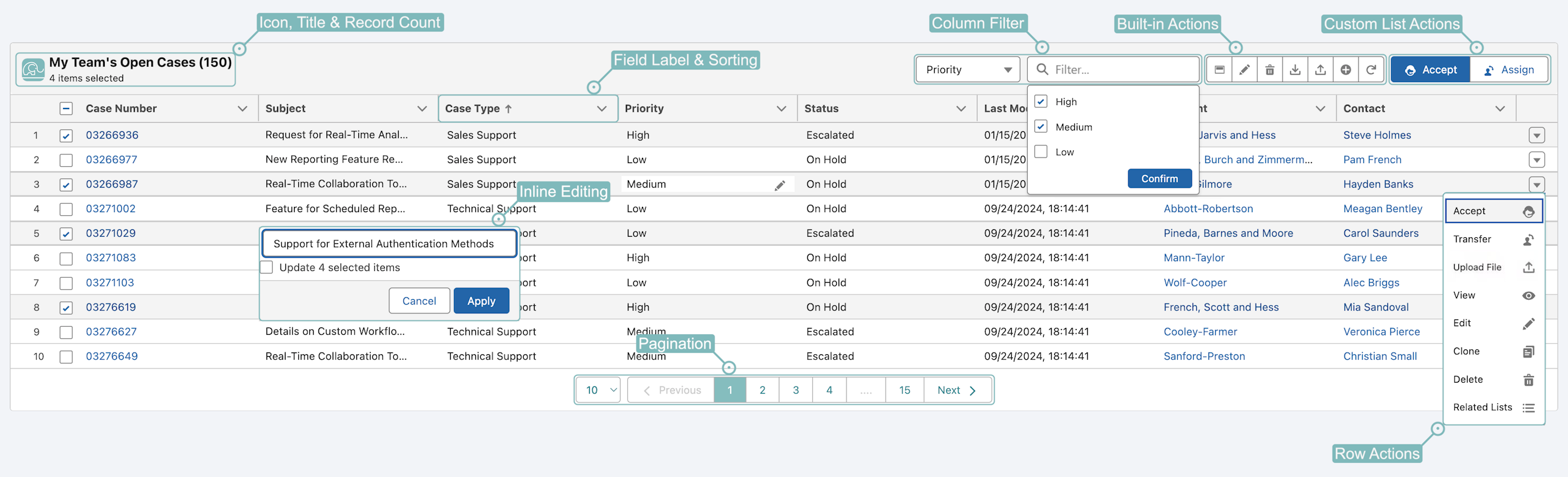
Configure Data Lists & Action Buttons as Executables, then drop them onto any
Lightning page — no developer required. Prototype in minutes.
Place on a list or a record pageOn a Data List for selected
rows or per-row · on a Lightning page for the current record
Preview transformed valuesReview & edit computed fields
before commit — single-record or line-editor
COMPOSE A 360° ACTIONABLE WORKSPACE
Account · Record PageAcme Corp
Mark for ReviewChange OwnerSnapshot
Open OppsWon (YTD)All
StageProposal, Verbal
NewClose WonClose Lost
NameStageAmountClose
NextGen MigrationNegotiation$148,000Q3
Platform UpgradeProposal$92,500Q2
Service RenewalVerbal$54,200Q2
Active CasesEscalatedClosed
PriorityHigh, Medium
EscalateCloseTransfer
CasePriorityStatusUpdated
03266987HighEscalated2h
03276619HighOn Hold1d
03276627MediumEscalated2d
A live actionable Data List — all customizable, delivered in minutes, not
weeks#Data List
The challenges
How DSP Solves It
×Rigid related lists
Out of the box, related lists are bound to a direct parent-child relationship — with no pagination,
mass edits, mass deletes, column filters, or custom actions.
✓Flexible, interactive lists
Render a fully editable list from a SOQL query with dynamic, complex filters — not just direct
parent-child — then work it live: inline & mass edits, mass deletes, new records, pagination,
column filters, and row actions.
×Actions disconnected from data
Record-level actions belong with the record, list-level actions with the list. In practice they end
up where they don't belong.
✓Right action, right place
Action Buttons sit where they belong — within a Data List for selected-rows actions, on the Lightning
record for record-level actions.
×Fragmented workflows
To complete one task, users jump between record pages, list views, reports, and quick actions —
losing context with every jump.
✓All on one Lightning page
Users complete the whole workflow on one page — view the record, scan Data Lists, act on rows or the
record itself.
×Heavy custom builds
Editable tables and action buttons require custom LWC plus Apex controllers and Screen Flows — every
tweak adds more hand-written code to build, test, and maintain.
✓Rules-driven, not hand-built
No LWC, no Apex controller, no per-page rebuild — DSP ships UI components that render from your
Executable configurations.
×Business logic locked with code
Bringing a meaningful action to life depends on a lengthy dev process — leaving the business with
limited room to shape ideas.
✓Working prototype in minutes
Each Executable goes from idea to a functional Data List or Action Button in minutes — hands-on
iteration, no code required.
360°Data & actions in
view
95%Less build
effort
0Code skills required
→0Tech debt, driven down
#Trigger
Automation & validation, as records — not code.
Every automation and validation rule lives as a Salesforce record — flat, bulk-safe,
and modular by design.
Records, not codeEvery automation rule is a Salesforce record
built through a guided UI — no nested Apex, or sprawl Flow canvas
Bulk-safe by defaultWrite rules as if for one record · engine
bulkifies queries, aggregations & DMLs automatically
Modularity enforcedBounded input, transformation & output
— structure, not team discipline
Recursion prevention built inRunaway re-execution blocked
automatically — no manual guards or static flags
Trace every triggerReplay any DML as a visual timeline: which
Executables fired, in what order, their inputs, their field-by-field changes, and the actions
committed — every Executable's exact behavior, in seconds.
Account.NotifyOwner.WhenClosedMessaging.SingleEmailMessage · scope: Status → "Closed"
EMAIL
Account.OpenOpportunitiesOwner.SyncUPDATE Opportunity · scope: OwnerId changed · fields: Owner,
Region
UPDATE
The challenges
How DSP Solves It
×Deep, coupled logic
In Apex, logic nests inside conditionals and loops; in Flow, canvases branch and invoke subflows.
Behavior runs deep and spreads across files — one small change ripples through many.
✓Flat & self-contained
Every rule is an Executable record — input, transform, output — that stands alone. No nesting, no
cross-class chains, no hidden dependencies.
×Bulk & performance traps
Apex needs hand-crafted bulkification; Flows hit performance walls at scale — demanding platform
expertise that takes years to master.
✓No bulkification by hand
No hand-crafted bulkification. The engine compiles your rules into an optimized plan that batches
queries, aggregations, and DMLs across thousands at once.
×Scattered, not governed
The rules driving one process are split across many code files — no single place to read, audit, or
change them.
✓Cohesive views to govern
Group #Trigger Executables into Pipelines — by object, domain, or shared scope — and manage them like
any Data List: navigate, filter, and reorder in one view.
×Code complexity snowballs
Every code change demands a dev, test, deploy cycle. As Apex/Flow accumulates, that cost compounds —
simple updates take days.
✓Rules, not code
Open a rule, change a formula, save — no per-rule code, admin owned. One small trigger handler wires
the object in, just once.
×Debugging is a black box
When automation misbehaves, you're deep in raw debug logs and scattered System.debug statements,
reconstructing what fired, in what order, and why, one cryptic line at a time.
✓See every rule fire, in order
Trigger Trace replays any DML transaction as a readable, visual timeline — every Executable that
fired, its Source and Target records, field-level changes, and the actions taken. Upload a saved
trigger log to view the same trace.
×Tech debt compounds
Every release adds more bespoke Apex and Flow to own, test, and refactor — debt that accrues across
the org and never pays itself down.
✓Debt-resistant by design
The model enforces modularity — every rule is a flat, uniform, bounded Executable record with
formula-driven simplicity. Boundaries can't blur and code can't sprawl, so tech debt never accrues.
100%Bulk-safe
10×Faster changes
0APEX PER RULE
→0Tech debt, driven down
Loaders that stay on the platform.
Native, reusable loaders configured as Executables — upload a CSV into a Lightning
component and process it inside Salesforce, so your data and credentials never leave the org.
Files and credentials are handed to third-party services — exposed in transit, vulnerable to
compromise.
✓Stays on the platform
Runs entirely inside the org — built on LWC and Apex. No installs, no external services, no
third-party credentials in the path.
×No real transformation
Most loaders map field-to-field. Reshaping, lookups, dedupe, and business rules happen in
spreadsheets before every upload.
✓Powerful transformation
180+ functions for text, numbers, dates, logic, and lookups — extensible with Apex. No more Excel
pre-cleaning before every load.
×Same wizard, every time
Every load means re-picking the object, action, and field mappings — the same steps, start to finish.
✓One-click re-run
The mapping lives in the loader, not a wizard — re-run on demand with no re-picking objects or
re-mapping fields.
×Hand-managed log files
Success and error CSVs are tracked by hand — easily lost, renamed, or forgotten. No reliable audit
trail.
✓Audit at scale
Execution logs are stored as related records, detailed to each row. Track every run, re-execute
failed rows, or revert changes.
×No Lightning integration
Loaders can't run from a Lightning page — no record context. Parent Ids get hard-coded into data
files.
✓Embedded in Lightning
Embed a Data Loader in any Lightning page — on a Data List, or as an Action Button. Users load data
right from the record's context — no hard-coded parent Ids.
×Not for business users
Installs, wizards, complex mappings — running a loader is tech-heavy. Not something business users
can pick up.
✓Admin-built, anyone-run
An admin configures the Executable once; anyone with access can run it — point, upload, go. No IT
skills, no help-desk ticket.
100%Stays in
Salesforce
180+Transformation
functions
100%AUDITED
1Build once, run anytime
FREE
Anyone can master Salesforce data, no SOQL, no code — point, click, done.
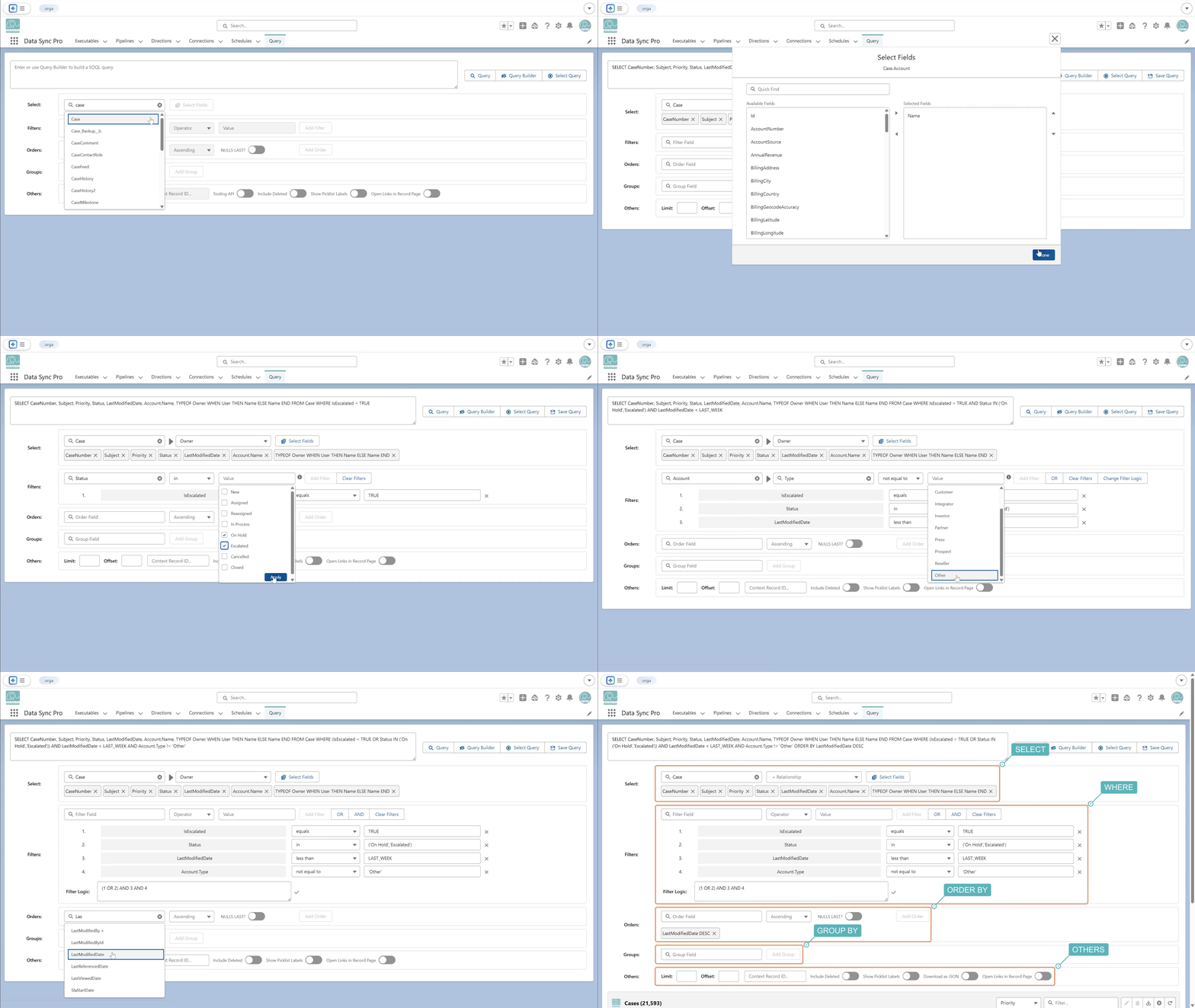
Query Manager is a single Lightning surface for building, saving, and running SOQL —
without writing a line of it — then acting on the results with full CRUD, all inside your org. Free on
AgentExchange.
Query BuilderGuided UI · auto-complete hints ·
point-and-click, no syntax to memorize
Metadata-aware resultsReal field labels, not API names ·
recognizes each field type and renders it accordingly — clickable references, formatted dates &
currency, and more
Auto paginationResults paginate automatically · live total
record count · adjustable page size
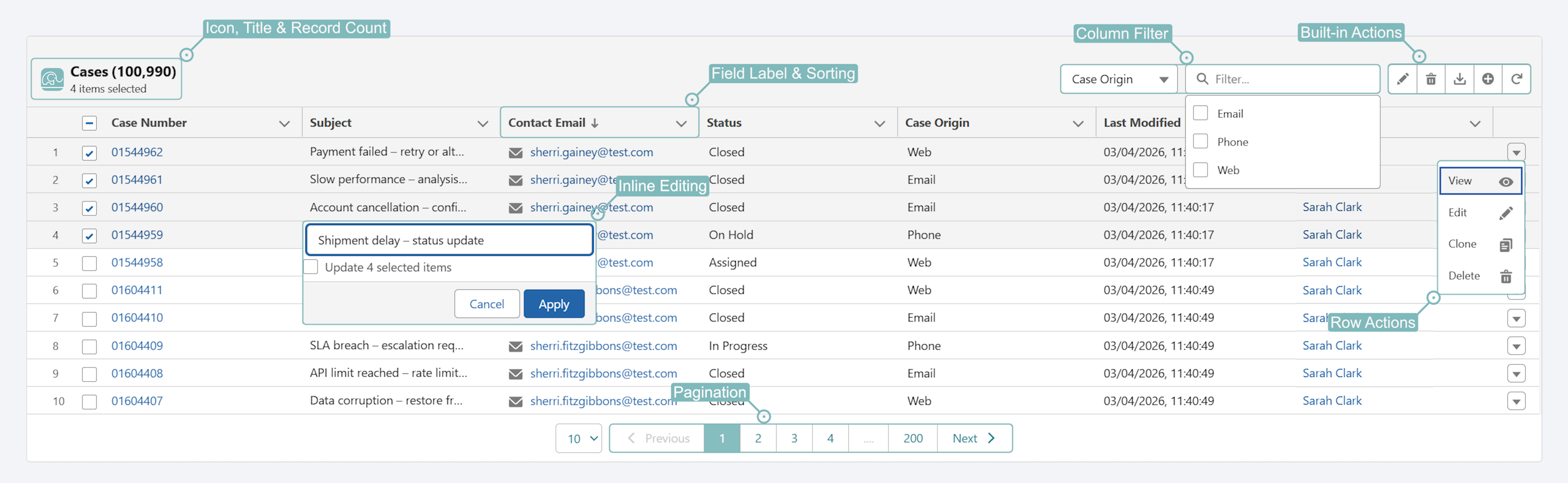
Editable Data List — full CRUDQuery results as Data List ·
pagination · column filters · sorting · inline & mass edits · create · delete · download · row
actions
Manage saved queriesSave · re-run common queries · label,
organize · no rebuilding
live · query builderfree · AgentExchange
QUERY MANAGER · FREEBuild · Decompose · Save · Run
SOQL · point-and-click · in LightningBuild · save · run
Data List rendered from a query#Query
The challenges
How Query Manager Solves It
×Off-platform query tools
Browser extensions and third-party add-ons operate outside the org — authorizing them grants a
third-party service access to org data, beyond your security model and controls.
✓Native LWC
A Lightning component that runs inside your org, always in the current user's context. No external
services, no separate authorization, no session exposed to a third party.
×SOQL is technical
Writing SOQL by hand means learning a query language — exact API names, relationship syntax, filter
operators — out of reach for most admins and business users.
✓No SOQL knowledge required
Anyone can build a query, without knowing SOQL. Point, click, done.
×Loads everything at once
Most query tools pull the entire result set into the browser — slow to render, heavy on the org, and
quick to choke on large objects.
✓Loads only the current page
Server-side pagination fetches just the records you're viewing — fast and light even on millions of
rows, with a live total count.
×Static, raw results
Most query tools return a static table of API names and raw values — something to read, not work
with.
✓Results you can work
A fully-interactive, metadata-aware Data List — real field labels and types, edit inline or in bulk,
paginate, and act on records in place.
×Raw API names & values
Most query tools return API field names and unformatted values — record IDs instead of names, raw
codes instead of picklist labels — leaving you to decode every column.
✓Metadata-aware results
Labels not API names, clickable references, formatted dates & currency — and type-aware editing:
picklists as dropdowns, dates as date pickers, lookups as search.
FreeNo license
0Lines of SOQL
LiveEditable results, not static tables
100%Native
Lightning
The shift
From sprawl to rule records.
Today's automation, batch jobs, and UI components scatter across Apex triggers, Apex batch
classes, Flows, and LWCs — wired together by hand. With DSP, every capability decomposes into cohesive,
bounded modules — each one a rules-driven Executable record, edited side-by-side and governed as data.
×Before · scattered across code & canvas
AccountTrigger.cls
AccountTriggerHandler.cls
AccountRollupService.cls
AccountValidator.cls
AccountNotifier.cls
AccountAssignment.cls
OpportunitySync.cls
RecursionGuard.cls
CrossOrgClient.cls
AccountTriggerTest.cls
BulkApexTestUtil.cls
ApexMockFactory.cls
Account_BeforeInsert
Account_BeforeUpdate
Account_AfterInsert
Account_AfterUpdate
AssignOwnerFlow
EnrichmentFlow
RollupSummary (sched)
VR_AccountRequired (rule)
NotifyOwner subflow
ValidateFields subflow
EnrichMissingFields subflow
CreateTask subflow
SyncOppFields subflow
PublishEvent subflow
CalcHealth subflow
CallbackHandler subflow
~ 28 files · ~3,400 LOC · touches 5+ files for a small change
PUBLISH AccountClosedEvent__e · scope: Status changed →
"Closed"
+6 more Executables in this Pipeline (07–12)
12 Executables · 0 Apex · 0 Flows · touches 1 record for any
change
Anatomy of an Executable
The ultimate abstraction.Input·Scoping·Match·Mapping·Action.
In DSP, every batch, data list, action button, automation, validation, and import is the same —
an Executable record, built from the same core stages. Learn one, and you know them all.
Store any business rule as a formula string and evaluate it at runtime from your own Apex. Change the logic
in a record — no redeploy, no rebuild.
The same 180+ functionsIdentical
library your Executables run on — nothing to re-learn.
Evaluate any SObject or JSONPoint
it at a record or a parsed payload — same call.
Rules live as dataLogic sits in
records, not hardcoded branches you redeploy.
EmailValidation.apexEVALUATE
// A rule, stored as a string — editable as dataString formula ='IS_BLANK(Email) || NOT(IS_EMAIL_ADDRESS(Email))';// Compile once, then evaluate against a recordpushtopics.Expression expr = pushtopics.Expression.compile(formula);Object invalid = expr.evaluate(account);if (invalid == true) { account.addError('A valid email is required.');}
evaluate() → true · validation
error added to the record
The actions
Every action a rule can take, without a line of Apex.
The final stage of every Executable. When a rule matches, this is what it commits — standard DML
or an Apex-powered action, bulk-safe and available on every surface.
Standard DMLNative record operations — no Apex
Insert
Update
Upsert
Delete
Undelete
Merge
Publish (Platform Event)
Query
Apex ActionsPlatform capabilities, invoked as configuration
Approval.ProcessSubmitRequest
Approval.ProcessWorkitemRequest
Database.LeadConvert
Messaging.CustomNotification
Messaging.SingleEmailMessage
One action layer across #Batch, #Trigger, #Data List, #Action
Button, and #Data Loader.
By the numbers
Same problem. A different order of magnitude.
Less build effort95%vs. hand-rolled Apex + Flow + LWC for the same automation.
Faster batch execution20×Up to 20× — optimized engine maximizes throughput within governor limits.
Record per rule1Every rule is one bounded Executable record — read it, audit it, change it as data.
Tech debt, driven down→0Every Executable is bounded. Modularity is structural, not a discipline.
Security & trust
100% Salesforce-native. Runs inside your org.
All processing runs in Apex inside your installed org. No data, no
credentials leave Salesforce — ever.
AgentExchangeSecurity reviewed
SOC 2 Type IIIndependently audited
Local data processing
No external endpoints, no middleware, no third-party processors — nothing sits between the data and
your org's Apex runtime.
Native security model
Executables are Salesforce records — governed by standard profile, permission set, and sharing
settings.
Managed cross-org connections
Cross-org actions use Named Credentials, fully managed by your admins. Never store credentials in code
or files.
Full execution history
Every #Batch or #Data Loader run writes Execution records — input, output, errors. Troubleshoot, replay
failed rows, or revert from one place.
Pricing
Priced per org. Never per seat.
Adding people never raises the bill. What you pay scales with the complexity you hand us: the
Executables (rules), Connections (orgs), and data volume DSP takes off your plate. You pay for the problem
solved — not for headcount. See
how a license is sized →
Free
$0/ month
Query Manager + 3 Executables. Real product, not a trial.
✓Query Manager
✓Schedule Job Management
✓Formulas as Configurable Rules
✓3 Executables · any combination of #Batch / #Trigger / #Data List /
#Action Button / #Data Loader
As complexity grows, you scale one dimension — not your whole tier.
Extra Connection$600 / connection / monthAdd additional production or sandbox connections for cross-org flows.
Extra Executables$1,200 / 100 / monthWhen your included Executables aren't enough — buy in blocks of 100.
Daily Batch Limit$1,800 / month · 1M recordsOr $3,600 / month for unlimited — up to the full Salesforce limit.
Prices shown per month, billed annually in USD.
Success plans
Support that matches the surface area.
Premium is a standalone success plan, available on the Business plan and up — a
professional-services engagement priced at 25% of your purchased Data Sync Pro license. Standard support is
included with all paid plans. See
full Support Policy →
StandardIncludedPremium25% of license
Support accessEmailEmail · priority queue
Acknowledge SLA2 business days4 business hrs critical · 1 day normal
OnboardingSelf-service guidesOnboarding sessions
Health checks—Semi-annual review
Solution architect—Up to 4 hr/mo consultsExtendable on request
Dedicated contact—Named CSM
Stop building code you'll need to rewrite.
Configure rules-driven Executables instead. Tell us about your setup and we'll show you how DSP
fits.
30 minutes — we'll walk through how DSP fits your org setup and answer questions live.
Thanks — we'll be in touch shortly.
Someone will reach out within one business day to find a time that works.
Become a partner
Bring DSP to your clients.
Send us leads or implement DSP for your clients — we'll share commercial terms and partner
onboarding details once we know your practice. Tell us a bit about yourself and we'll be in touch.
Partners earn a meaningful referral bonus on every closed deal
Thanks — we'll be in touch shortly.
We review every partner inquiry personally. Expect a note within two business days with next steps and the
partner agreement.
Configure your plan
Set up your Business subscription.
Tell us about your orgs. We'll confirm the right shape, send a quote, and provision once
you're ready.
Plan request received.
Your request just became a Lead in our Salesforce org. We'll review your org setup and follow up within one
business day with a quote and next steps.